Artificial Intelligence · New Features · Smart Listings

Claz AI assistant – what it can do today

Over the past few weeks we’ve been working on improving our AI assistant, mostly adding new capabilities and focusing on user experience. Our goal is for the assistant to be able to automate most of our users’ day-to-day tasks and handle most of the customer support inquiries quickly.
What AI assistant can do today

Proactive help. AI assistant will reach out to the user if an important detail is missing from their listing and the assistant cannot figure it out from the image or the description. The assistant will use our internal messaging system and will offer help with populating the missing details on the spot.

Request Assistance. We’ve added “Request Assistance” button to some of the user pages, making it easier for our users to initiate a conversation with the assistant.

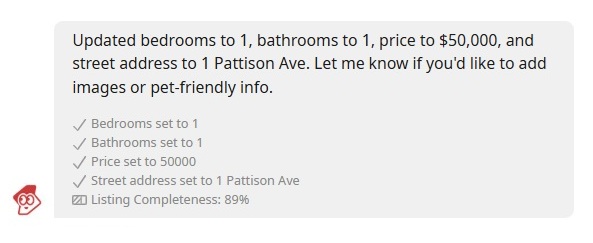
Manage listings and profile details in chat. Users are now able to edit most of their listing details in AI assistant chat, including title, description, price, location, category, photos, and category-specific fields like dog breed, bedrooms, dates, and more. Users should be able to upload photos of the listing and the assistant will automatically add them to the listing on request.

Activate, pause, and clean up. Users are also able to activate or pause their listing from the AI assistant chat, delete or restore listings, activate or pause all of their listings at once, or clean up expired listings.

Referring to other listings. AI Assistant should be able to look up information on users’ other listings and start a follow-up conversation for a different listing as needed.

Human backup. If the assistant cannot help, it can now route your request to our support team.

You’re in control. Turn AI assistant on or off under Account / Preferences / AI Assistant. You can also use Disable Assistant in AI assistant chat.

How we made it easier

We did not build a separate chatbot or a new page to learn. The assistant lives in the messaging you already use. When it updates your listing, you see what changed – update notes and a completeness progress indicator. The listing sidebar refreshes automatically. Each conversation focuses on one listing; if you need help with another ad, the assistant opens a follow-up thread. First outreach messages are reviewed before they are sent, and rate limits keep things from getting noisy.

We want your feedback

This is still evolving. If something goes wrong, please tell us – reply in the conversation or use our Contact Us form.

We also want to know whether the assistant helped you, got in the way, or felt unnecessary. Your experience is the best signal we have for what to improve next. Real people read every conversation, and your feedback shapes what we build.
Artificial Intelligence · New Features · Smart Listings

At Claz, we make AI work harder so users don’t have to

Listing something online usually means filling out forms — picking the right category, entering details one by one, formatting everything just right.

Claz strives for simplicity — but that doesn’t mean giving up on structure. Relevant details matter. They help people find what they’re looking for, and they help the site deliver better results. The problem is that filling in all those details is tedious, time-consuming, and inconvenient. Most services make people do more to get better results. At Claz, we make AI do more instead.

Claz has always worked to fill in structured data behind the scenes, with as little friction as possible. AI has become a powerful tool in making that happen at a completely different scale.

Extracting what’s already there

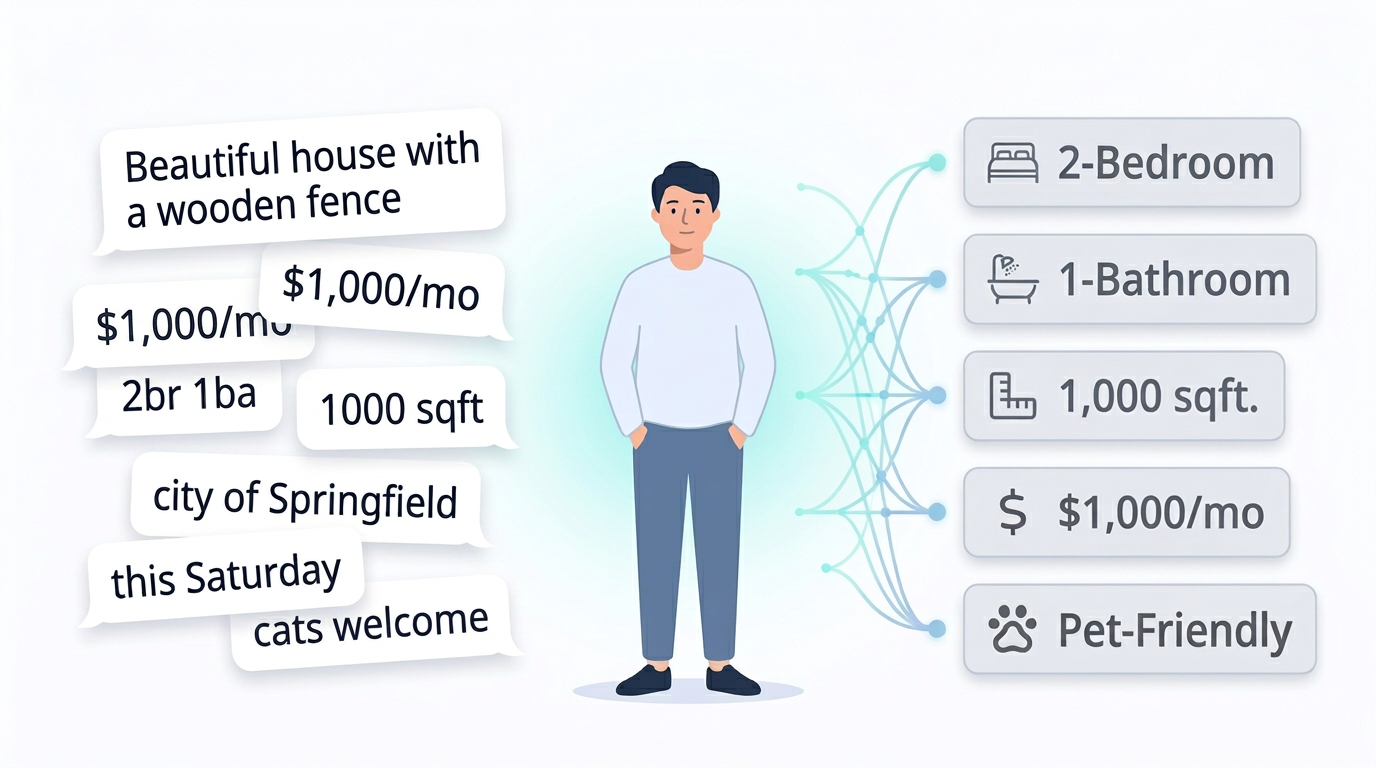
When someone lists something on Claz, AI reads what they wrote and fills in the details — price, location, dates, and dozens of other specifics depending on what’s being listed.

Someone writes “$1,000/mo, 2br, downtown” — AI picks up the price, bedroom count, and fills in the right fields. A garage sale flyer has the address on it — AI reads it. Someone writes “this Saturday” — AI resolves the actual date.

The information is already there. We make AI put it where it belongs — so users don’t have to.

Asking for what’s missing

Every type of listing on Claz has its own set of expected details. A rental needs bedrooms, bathrooms, and square footage. A dog adoption needs the breed. A garage sale needs a date and an address. AI knows what’s expected — and what’s still missing.

When something important is absent, an AI assistant reaches out in chat — the same chat used for regular conversations between buyers and sellers. It asks a simple question. The user replies naturally — “1000, 123 Main Street, ap. 7” or “2 br 2 ba” — and the assistant fills in the details on the spot.

It all happens in a quick back-and-forth — no forms, no extra steps — and the listing becomes significantly more complete without the user doing more.

Claz has always worked to take care of the details quietly and only reach out when something is truly missing. AI lets us do that better and at a much greater scale.

Everything at Claz is created by real people. We make AI work harder so their listings work harder for them.

Uncategorized

Enhancing Our Listings: More Detailed Item Descriptions Now Available

Back in September, we introduced a refreshed, image-focused layout – a cleaner, more visual experience designed to help users browse listings faster and with less clutter.
You can read that announcement here: Revamping Our Page Layout: A New Tile View Experience

Since then, we’ve received a lot of valuable feedback from our community.
Many visitors told us they loved the simpler, more visual interface – but also wished some listings included more detailed descriptions. With certain items, users wanted additional context, nuance, or specifics that images alone couldn’t fully reflect.

Today, we’re excited to introduce an update inspired directly by this feedback.

We’ve added an optional, expanded item description section that provides more detail without sacrificing the clean, visual layout.

How it works:

  • On mobile:
    Tap the description area to smoothly expand it.
  • On desktop:
    Hover your cursor to reveal the extended content.

This keeps the page tidy, lightweight, and fast – but gives every user the option to dive deeper whenever they want.

For this enhanced view, the focus is placed on the seller’s own, user-created description.
This allows each listing to reflect the seller’s voice, unique details, and important context that standardized attributes may miss.

Of course, all standardized attributes and structured data still work as filters, helping users quickly narrow down searches by the specifics that matter most – but the descriptive text is now front-and-center when expanded.

Your feedback drives our product decisions.
Many users asked for:

  • clearer descriptions for certain kinds of items
  • additional context that photos alone couldn’t convey
  • optional detail that doesn’t clutter the main layout

This update delivers all of that – giving you a flexible, more informative browsing experience.

We’ll continue refining layouts, descriptions, filters, and media presentation to help every visitor find what they’re looking for faster and more intuitively.
As always, your feedback is essential – keep it coming!